








The EMV® 3-D Secure (3DS) White Paper provides industry participants with a more accessible, easy-to-use resource that aims to promote the understanding and effective use of key EMV 3DS Specification features to help seamlessly authenticate consumers, while reducing online fraud.
In this post, Tabitha Odom, Chair of the EMVCo 3DS Working Group, explores one of these features – out-of-band (OOB) authentication – and explains how EMVCo has been working with the industry to provide recommendations to help improve the user experience and approval rate when it is used in browser-based transactions.
What is OOB authentication?
Whenever an online transaction is deemed high-risk by the issuer or requires cardholder confirmation – such as with subscription and recurring payments – the cardholder must provide additional information directly to the issuer for the transaction to take place.
One way to do this is OOB authentication. This is where the cardholder authenticates with their bank through a separate channel – such as their mobile banking app – rather than in the browser. The use of a separate channel reduces the risk of fraud and provides a consistent, familiar experience for consumers across all merchants.
EMV 3DS supports OOB authentication for both browser and app-based transactions, but this post specifically explores how EMVCo is working to help increase success rates by improving the user experience for browser-based transactions. An illustration of an OOB authentication flow is also available within the EMV 3-D Secure UI/UX Design Guidelines.
Understanding the browser-based OOB authentication flow
When the issuer determines a transaction should be challenged, the merchant opens an iframe – which loads and embeds another HTML element within a web page – on its checkout page and redirects to the issuer. The issuer provides the user interface (UI) in the iframe and instructs the cardholder to manually switch from the merchant’s checkout page to their OOB authentication app, which may be accessible using a browser or a mobile app on the same or different device.
Once the cardholder has completed the authentication using their app, they manually switch back to the checkout page and select the ‘Complete’ button.
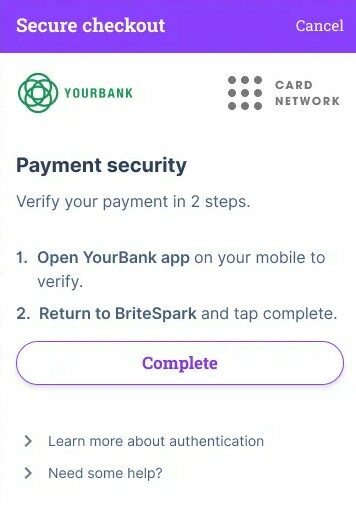
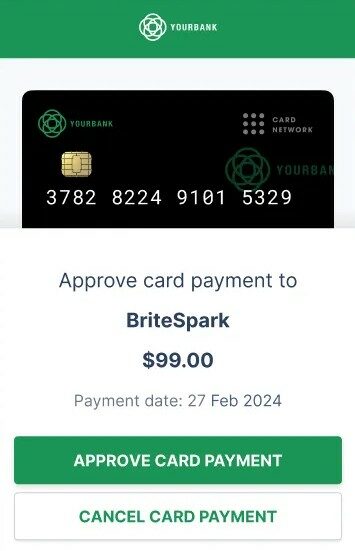
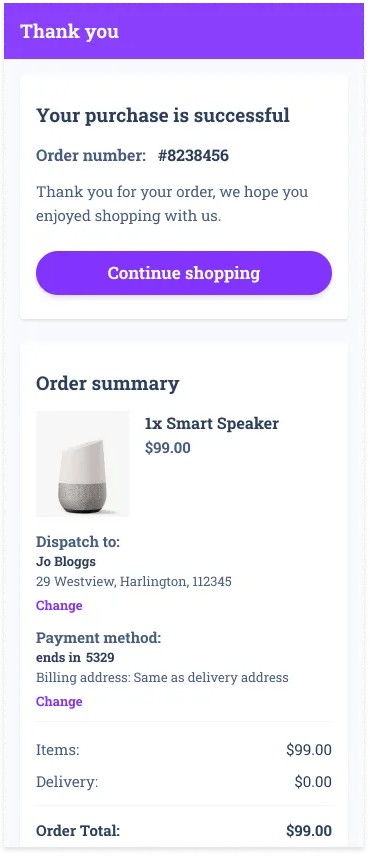
Example of an OOB authentication during a purchase where the authentication happens with the cardholder’s banking app (Yourbank in this example)
The EMV 3DS Specifications also enable an alternative OOB browser-based flow where the issuer directly accesses the result of the OOB authentication and sends it to the merchant before the cardholder switches back to the merchant checkout page. EMVCo recommends this approach, as it means the cardholder does not need to manually click a ‘Complete’ button – helping to prevent the cardholder inadvertently missing this final step and the transaction subsequently timing out.
How merchants and issuers can improve OOB authentication in browser-based use-cases
Some merchants and issuers have reported a lower success rate for OOB authentication when initiated from a mobile browser. This typically presents as the issuer sending declined authentication responses to the merchant indicating that the transaction timed out, or the merchant being unaware that the cardholder has successfully completed the challenge.
A primary cause of this issue – which is outlined in detail within section 5.3.2 of the PDF-version of the EMV 3DS White Paper and in the interactive EMV 3DS White Paper – is when the cardholder is engaging with a merchant on a mobile browser app and uses a mobile app on the same device for OOB authentication.
In response, EMVCo has been working closely with the merchant and issuer community – including Netflix, G+D Netcetera and Entersekt – to enhance the browser-based OOB authentication experience. This resulted in the publication of dedicated recommendations
EMVCo strongly encourages all merchants and issuers to view the full recommendations and sequence diagrams within the EMV 3DS White Paper, which is available in an interactive online format to provide industry participants with a more accessible, easy-to-use resource.
In addition to these recommendations, EMVCo is also engaging with industry participants to help address underlying technology challenges. For instance, it is sharing feedback with web browser providers to explore how the browser can support the successful completion of the challenge.
Enhancing the OOB authentication user experience
EMVCo has also updated the EMV 3DS FAQ to outline how the OOB authentication experience can be further improved by providing clear guidance and fallback options to the cardholder. Examples include displaying a countdown timer showing how long the consumer has left to complete the authentication, so they are clear on the remaining time available, and suggesting the consumer manually switches to their OOB app if a push notification is not received.
Realising future opportunities
Looking ahead, EMVCo’s ongoing initiative to simplify the EMV 3DS Specifications will support further enhancements to OOB authentication by increasing agility in development and deployments. As this work progresses, EMVCo is committed to engaging with the hundreds of industry stakeholders that contribute their knowledge and expertise as EMVCo Associates and Subscribers. All interested organisations are also encouraged to explore ways to participate in EMVCo and share their input.


 by Arman Aygen